
Instantly Load Shopify Pages with Speculation Rules API
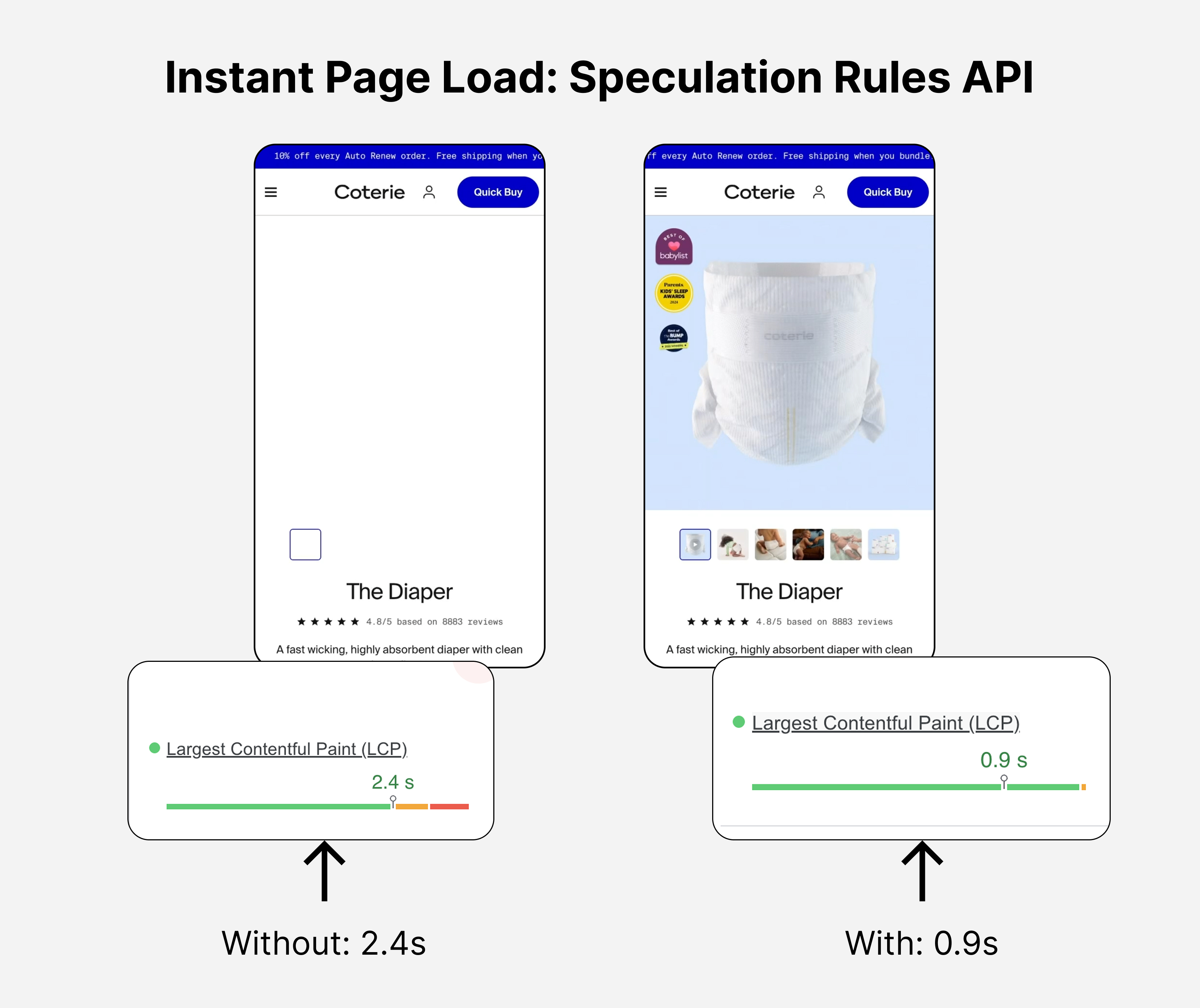
How to instantly load Shopify pages with the Speculation Rules API. Free code snippet included.
Speed = sales
Imagine you're at a store and the cashier is really slow. You get frustrated and leave without buying anything, right?
That's exactly what happens online. When your store is slow, people leave before they buy.
Here are the facts:
- If your store takes longer than 3s to load on mobile - 53% of users bounce
- Every 100ms reduces your CVR by 7%
These have been validated by reports from Google: Milliseconds Make Millions, and Akami: Milliseconds are Critical
What Is Speculation Rules?
Speculation Rules is like having a helpful robot that guesses what your customers will do next and gets the page ready before they click.
Normal way: A customer clicks a link → browser downloads the page → page shows up
With Speculation Rules: Browser guesses they might click a link → downloads the page ahead of time → when they click, the page is already ready
Shopify recently ruled out a very simple utilisation - and boosted all stores by 180ms. Shopify Speculation Rules API.
But using our own version, we can get even better results, specifically tailored to our user journey.
There are two ways to use this:
Prefetch (The Easy Way)
"Prefetch" means: Download the page but don't show it yet. Just have it ready.
Think of it like this: You're getting ready for lunch. You take bread out of the fridge (download) but don't make the sandwich yet (don't show). When you want the sandwich, the bread is already there.
Speed improvement: 300–800 milliseconds faster
Prerender (The Super-Fast Way)
"Prerender" means: Download the page, show it invisibly on your computer, and have it 100% ready to go.
Think of it like this: You make a complete sandwich in a secret kitchen, then when someone asks for it, you just hand them the finished sandwich.
Speed improvement: 500–1,500 milliseconds faster (half a second to 1.5 seconds)
The Good Things About Speculation Rules
It Makes Pages Load Faster
When pages load faster, people buy more. Your store feels better. Your customers are happier.
It Works on Lots of Pages
You can tell the robot: "Get these 5 collection pages ready" or "Get all product pages ready" — and it happens automatically.
The browser makes the final decision
Factors such as a phone with:
- Turned on "battery saver" mode on their phone
- Turned on "data saver" mode to use less internet
- Is on a slow internet connection
can stop prefetching.
It's Better Than Old Methods
Older ways of speeding up pages:
- Don't work well on all browsers
- Get blocked by browser settings
- Waste lots of power
Speculation Rules is newer and way smarter.
The Bad Things About Speculation Rules
Before you use it, you need to know the problems:
More expensive for your server
Every time the browser prefetches a page, it's like a real visitor clicking it. Your server has to do work.
If 100 people look at your homepage and the browser prefetches 5 pages for each of them, that's 500 "fake clicks" your server has to handle.
If people don't actually visit those pages, that was wasted work. Like cooking food that nobody eats.
For Shopify this doens’t matter because they handle the traffic - but if you pay for your own hosting, it can add up.
Prerender is even worse — it's like your server is cooking the whole meal in advance.
Your Analytics Get Messed Up
When you use tools like Google Analytics to count visitors, Speculation Rules causes a big problem:
- Browser prefetches 20 pages
- Only 5 people actually visit them
- But Google Analytics counts 20 visits because the HTML was requested
Your numbers are wrong! You think people are visiting pages they're not actually looking at.
This makes it hard to:
- Know which pages people really like
- Understand why people buy things
- Fix problems on your store
Accidents Can Happen
Sometimes prefetching a page by accident causes problems:
- You prefetch a "logout" page → customers get logged out
- You prefetch an "add to cart" page → things get added to carts by accident
- You prefetch a sale page → it shows the wrong number of items
These are bad user experiences. Customers get confused.
How to Use Speculation Rules
Just add these script snippets to your main page. In Shopify this will be your templates/theme.liquid file
Example 1: Easy Prefetch
Tell the browser: "Download these specific pages so they're ready"
<script type="speculationrules">
{
  "prefetch": [
    {
      "urls": ["/collections/all", "/collections/bestsellers", "/cart"]
    }
  ]
}
</script>
What this does: When someone visits your homepage, the browser quietly downloads:
- Your main collection page
- Your bestsellers page
- Your cart page
Is it risky? No, very safe. These pages don't do anything when they download.
How fast? 300–800 milliseconds faster when someone clicks to these pages.
Example 2: Smart Prefetch (Prefetch Many Pages Automatically)
Tell the browser: "Prefetch all product pages" but skip some:
<script type="speculationrules">
{
  "prefetch": [
    {
      "where": {
        "and": [
          { "href_matches": "/products/*" },
          { "not": { "href_matches": "*variant_id=*" } }
        ]
      }
    }
  ]
}
</script>
What this does: When someone visits your store and sees product links, the browser prefetches them. But it skips product pages with complicated tracking stuff.
Is it risky? Pretty safe. But test it first.
How fast? 300–800 milliseconds faster on product pages.
Example 3: Super-Fast (Prerender)
Make one specific page super-duper fast with prerender:
<script type="speculationrules">
{
  "prerender": [
    {
      "urls": ["/products/bestselling-item"]
    }
  ]
}
</script>
What this does: Before anyone even clicks, your computer builds the entire bestseller page invisibly. When someone clicks the link, it appears instantly like magic.
Is it risky? Medium risk. Lots of things can go wrong. Test it!
How fast? 500–1,500 milliseconds faster. Super fast!
Cost: Uses lots of power. Only do this for your most important page.
Example 4: Be Nice to Your Server (Eagerness)
You can tell the browser: "Only prefetch when the person actually looks at the link" instead of "prefetch everything right away"
<script type="speculationrules">
{
  "prefetch": [
    {
      "urls": ["/collections/all"],
      "eagerness": "immediate"
    }
  ],
  "prerender": [
    {
      "urls": ["/products/bestseller"],
      "eagerness": "conservative"
    }
  ]
}
</script>
The three levels:
"immediate"= Start right away (hungry!)"eager"= Start if the browser is not busy (normal)"conservative"= Only when the person hovers over the link (polite to your server)
Use "conservative" to save your server's power.
Real Examples for Your Store
Example: The Normal Shopping Path
Most people follow this path:
- Visit your homepage
- Go to a collection (like "Summer Dresses")
- Click a product
- Add to cart
- Go to checkout
So prefetch the pages you know they'll visit:
<script type="speculationrules">
{
  "prefetch": [
    {
      "urls": ["/collections/all", "/collections/new", "/cart"]
    }
  ]
}
</script>
Why it works: You know for sure people visit these pages.
Risk: Very low.
Speed gain: Your store feels 2–3 times faster on these pages.
Example: A Big Sale
You're having a Black Friday sale. You want the sale page to load super fast:
<script type="speculationrules">
{
  "prerender": [
    {
      "urls": ["/collections/black-friday-deals"]
    }
  ]
}
</script>
Why it works: Everyone clicks the sale link. You want it to be instant.
Risk: Medium. Make sure your inventory numbers are correct.
Speed gain: Almost instant load (magical fast!)
Example: Mobile Shoppers
Mobile people care most about speed. Tell the browser to prefetch on phones:
<script type="speculationrules">
{
  "prefetch": [
    {
      "where": {
        "and": [
          { "href_matches": "/collections/*" },
          { "not": { "selector_matches": "[data-exclude-prefetch]" } }
        ]
      }
    }
  ]
}
</script>
Why it works: Slow phones lose more customers.
Risk: Low.
Speed gain: Huge! Mobile shoppers see 2–3x faster pages.
Things That Can Go Wrong (IMPORTANT!)
❌ DO NOT DO THIS
Never prefetch these pages:
/cart/addor/cart/update— This adds things to carts by accident!/account/logout— People get logged out!/checkout/step-1— This can create orders by accident!/account/orders— This shows private information!
Why? When the browser prefetches these, bad things happen before the person even clicks.
✅ SAFE TO PREFETCH
- Collection pages (all the products in a category)
- Product pages (single products)
- Your main pages (homepage, about, contact)
- The cart page (just looking, not changing anything)
Will This Work on My Phone?
Speculation Rules works on:
- Chrome and Edge browsers — Yes! ✅
- Safari (newer versions) — Yes, but only prefetch ✅
- Firefox — Kind of, getting better ✅
- Older browsers — They ignore it and work normally ✅
So it's safe to use. Older browsers just won't get the speed boost, but they won't break either.
The Most Important Things to Remember
- Speed = Money — Faster stores make more money
- Prefetch is safe — Download pages in advance without running them
- Prerender is super fast but expensive — Only use on your best pages
- Be careful with side effects — Don't prefetch pages that do things
- Your server has limits — Don't prefetch too many pages or your server gets tired
- Check your analytics — Prefetch might mess up your visitor numbers
- Start small and test — Prefetch your cart and collection pages first
Where to Put the Code
If you use Shopify, you can add this code to your theme. Ask your designer or go to your theme settings and find where to add custom code. Put the script in your header or footer.
Quick Start
Copy and paste this to get started:
<script type="speculationrules">
{
  "prefetch": [
    {
      "urls": ["/cart", "/collections/all", "/collections/bestsellers"]
    }
  ]
}
</script>
This is safe and will make your store faster. Test it for a week and see if people stay longer and buy more!
If you want the MDN documentation - check here: https://developer.mozilla.org/en-US/docs/Web/HTML/Reference/Elements/script/type/speculationrules
Cool video explaining some of the nuance (if you’re a visual / audible learner)
Questions? The key is: start simple, watch what happens, and make it better over time. You got this!