
INP Overview
Interaction to Next Paint is the lag between a tap or click and the next visual update.
What is INP
It's how long it takes for any interaction on the page to respond. For all intents and purposes - the gap between when you click / scroll / tap and when the browser responds

How to know if its a problem on your PDPs
When you change variants, tap icons, or scroll through images - it feels janky / delayed
Fastest way to check:
Local testing: always compare on a draft theme first.
Good for quick checking:
Shopify Reports - CLICK HERE
Good for a visual inspection (more accurate):
Fastersite.ai - CLICK HERE
Caveat;
This is the hardest thing to track / test locally. Because it’s based on user interaction. When this is measured on live websites, we don’t know the exact interactions any specific user took. The only way to replicate is to do those same interactions yourself and measure the impact.
Why is it important?
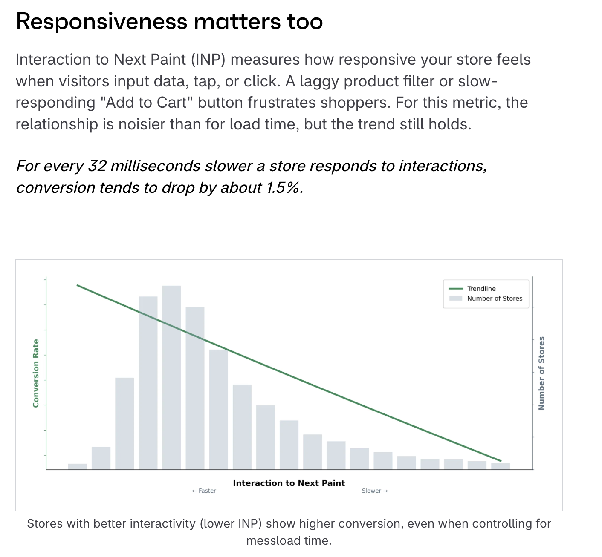
High INP has decreased CVR.
The bigger gap between an interaction and the visual update - the worse it feels. This delay causes friction at the most critical part of the user journey.
In particular, especially for brands which focus on multi-product purchases, AOV, and gamification.
The more frustrating this experience is, the less patience users have moving through the checkout funnel, and you will see dropoffs at all stages (ATC, reached checkout, completed checkout).
Shopify have done research on this and shown for every 32ms of INP - CVR drops 1.5%.
Shopify - Performance Report (2026) - LINK
Google - Milliseconds Make Millions (2020) - LINK
Shopify enterprise performance report 2026
Unlock everything!
This will be slowly releasing in the build up to BFCM 26. To get the rest of the training in advance, sign up to the newsletter. New training live every week